A legacy EHR used by thousands of mental health practices had a problem that appeared visual but wasn't. As the sole product designer, I led a phased redesign that kept a live product running while rebuilding it underneath.
5x
Beta practice adoption in six months.
1
Designer - research, UI, design system, and QA
2
Live product versions supported during transition
Therasoft had become the most feature-complete platform in its category — but every feature had been built without a shared design system, by whoever was available at the time. Reviews consistently mentioned the same two things: the software looked old, and new users needed a support call just to get started.
The owner's framing going in was simple: it looks old, fix the look. Research with clinicians, admins, and the support team told a different story — this wasn't a visual problem. It was a usability and accessibility problem wearing a visual complaint as its symptom.
A live product, in active daily use by thousands of practices, that couldn't go down for a rebuild. Every change had to ship without breaking someone's workday.
No existing design system. Components had been hand-coded inconsistently across the product, with no documentation of what existed or why.
Two incompatible user bases: power users with years of muscle memory who feared change, and new users who couldn't find their footing at all.
An offshore development team with a language and tooling gap — and a mid-project pivot from Blazor to ASP.NET that invalidated the original handoff plan.
I separated the stated complaint from the underlying one — mining reviews, auditing competitors, and walking the product cold as a new user before any stakeholder framing set the direction. That reframed the brief from "make it look modern" to "make it usable for newcomers without breaking it for the people who'd relied on it for years."
From there the work ran on two tracks: cut page-level noise before touching any single component, and check every change against user mindsets built to represent both the legacy power users and the newcomers. The calendar below is the clearest example of how that played out — the same logic drove the intake redesign and the design system underneath, both covered in the process sections.
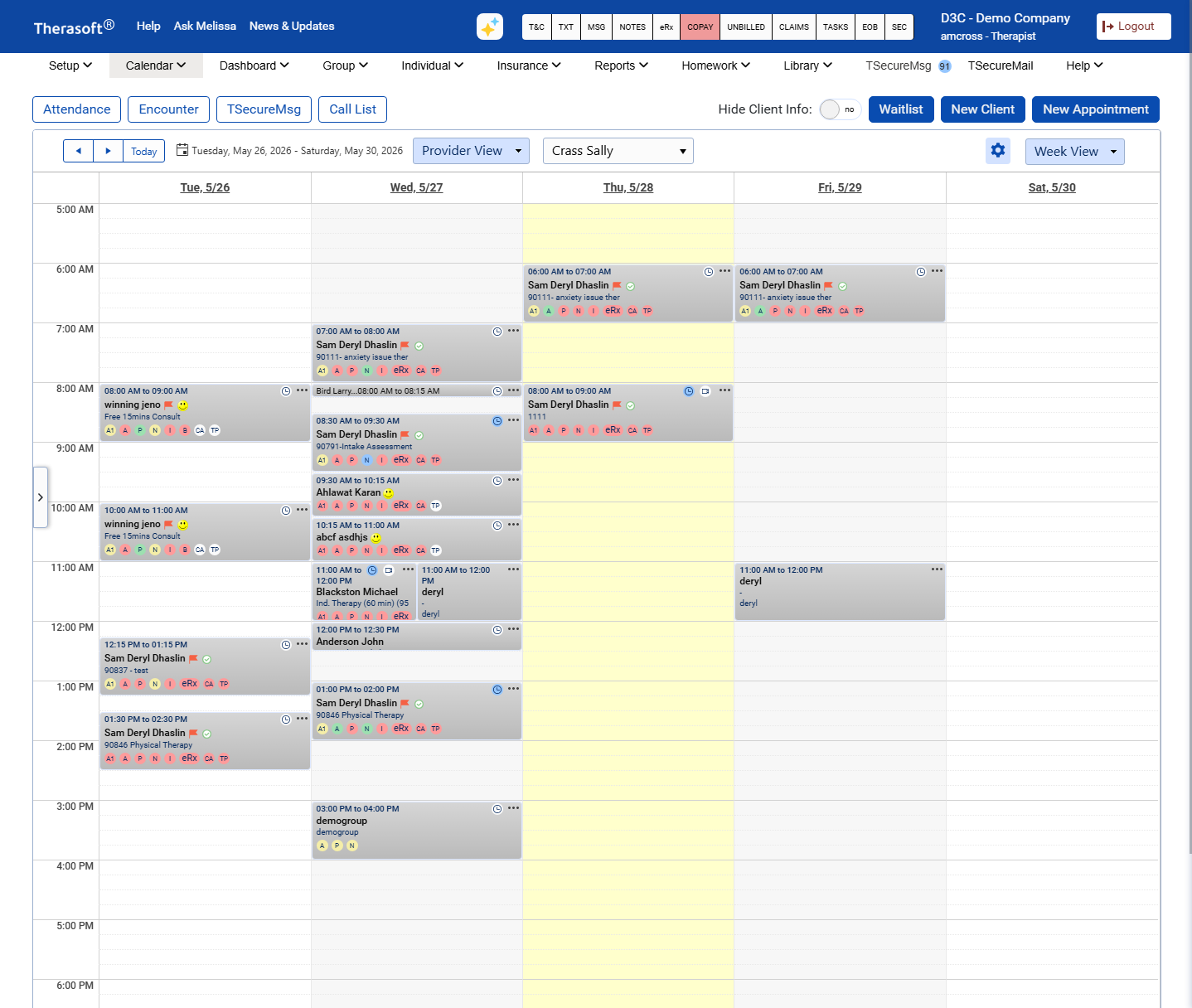
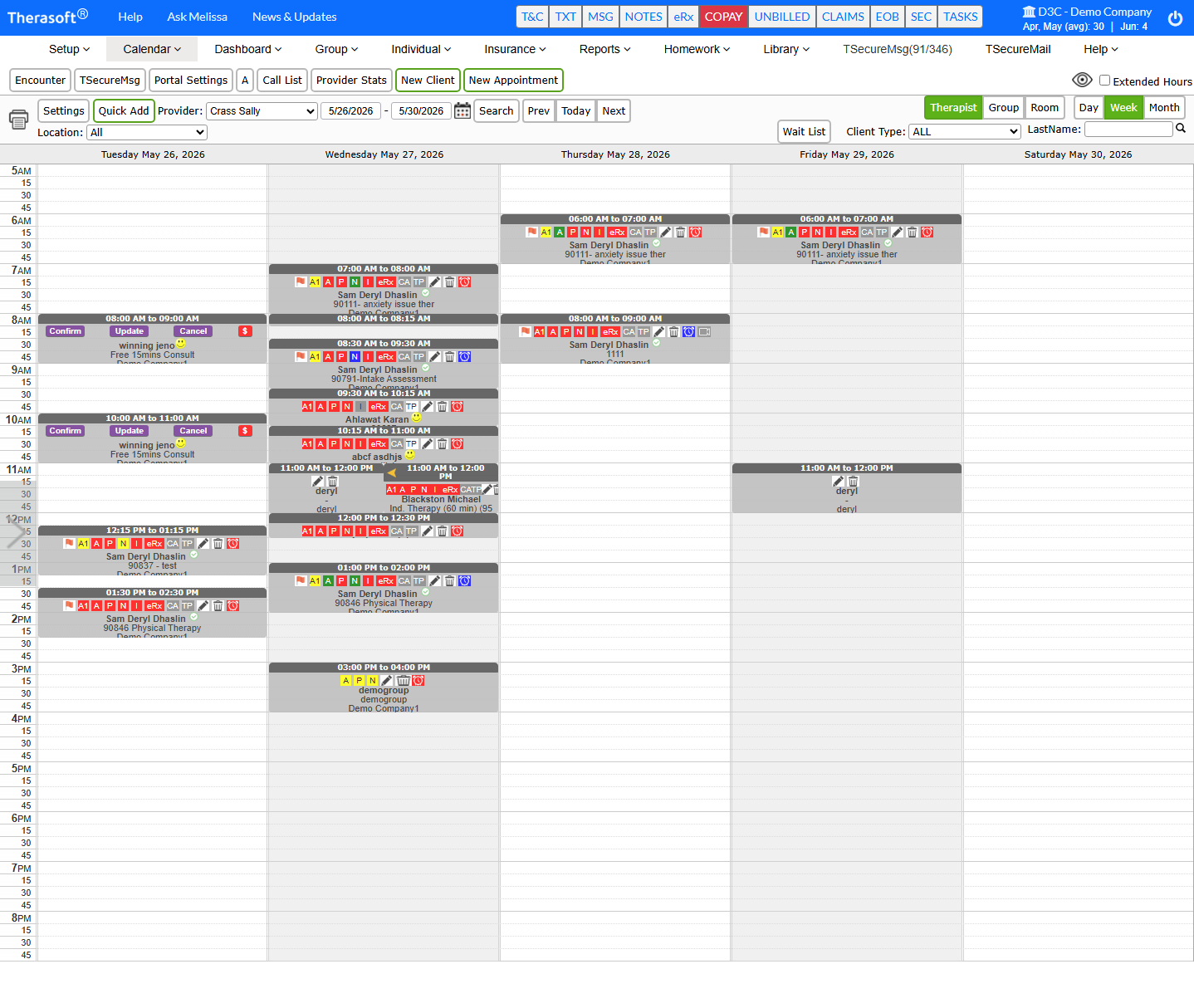
Of the surfaces I redesigned, the calendar concentrated the most complaints and shows the method most clearly. Buttons were scattered, every appointment card tried to show everything at once, and the most-scanned piece of information — the client's name — was buried third in the visual hierarchy, after time and a cluster of action buttons.
The real design tension wasn't visual, it was between two user mindsets I'd mapped. Experienced users, many with ten-plus years in the legacy product, valued efficiency and familiarity above all, and when the beta shipped they had one non-negotiable demand: "I can't see the full day." They wanted everything visible at once. Newer users pulled the other way: several who wore glasses or contacts told me condensed cards forced them to zoom in to read anything. Showing the full day meant denser cards; denser cards hurt legibility. I couldn't fully satisfy both with a single card.
Appointment length became the way through. Instead of every card carrying the same load, what a card showed scaled with how long the appointment was — a 15-minute check-in and a 45-minute session aren't the same information problem. That preserved the full-day visibility legacy users demanded while keeping the most critical information legible against the accessibility standards the original calendar failed. The tradeoff was deliberate and named, not stumbled into: less detail on the shortest cards, in exchange for a full day that everyone could still scan.
"It used to take me 5 minutes to create an appointment because I'd get distracted and easily click off the window."
- Therasoft customer, on the friction the redesign removed
Rather than a hard cutover, the release went out as a beta to the platform's largest practices first. The beta caught something no amount of upfront research had: customers quietly reverting to the old version because the new calendar lost full-week visibility on one screen. Density wasn't clutter to a therapist managing a packed week — it was information.
I rebuilt the appointment cards into a compact layout that held up even in tight spaces, re-released to the general user base, and ran both versions in parallel until the legacy product could be sunset.
The sections below hold the fuller story — the research methods, the roadblocks, and the reasoning behind each call. Open whichever ones are relevant to what you want to see.
01
Reviews, competitive analysis, and walking the software cold
Method: review mining → competitive teardown → cold walkthrough as a new user, before any stakeholder framing entered the process.
02
Legacy vs. modern users, power vs. casual, across three practice types
03
Telerik/Kendo, a Blazor-to-.NET pivot, and building a system from inside a constraint
Outcome: a working, documented Figma design system with .NET-ready code underneath each component — built reactively, mid-project, inside a hard technical constraint.
04
The client-intake redesign that needed a second version
"He explained the research behind the current changes, then offered a way to solve my particular issue — a button to copy a previous code that we could edit. It was the perfect solution for everyone."
- Cassandra — Therasoft Customer
05
India-based offshore developers, and finding a working rhythm through trial and error
06
Two calls I'd revisit
Newer and younger users were immediately happier — the breathing room and grouped information made the product make sense in a way the old wall of buttons never did. Legacy users needed something different: not less density, but a way to reconstruct their own version of "everything visible," which we built as collapsible tabs that could stay open.
The pattern that held throughout: every time a user complained, the team checked with them to find the real issue — and the real issue was usually training, not design. A library of training videos and a properly designed onboarding flow grew directly out of that finding. Five months after the beta launched, practice adoption had grown 5× — from 15 practices to around 70 — and the redesign moved toward general release as I transitioned off the project.
The lasting lesson was sharper than the redesign: keep the list of who you're designing for explicit and complete. The one time I let it blur, I lost track of an entire user group — admins — until late in the process. I design with that map in front of me now.